The Table Transformer was introduced in “PubTables-1M: Towards comprehensive table extraction from unstructured documents” by a set of authors from Microsoft. They trained two object detection models (based on the DETR architecture) with 947,642 fully annotated tables (PubTables-1M dataset) — one for table detection and one for table structure recognition and released under this repo with MIT license.
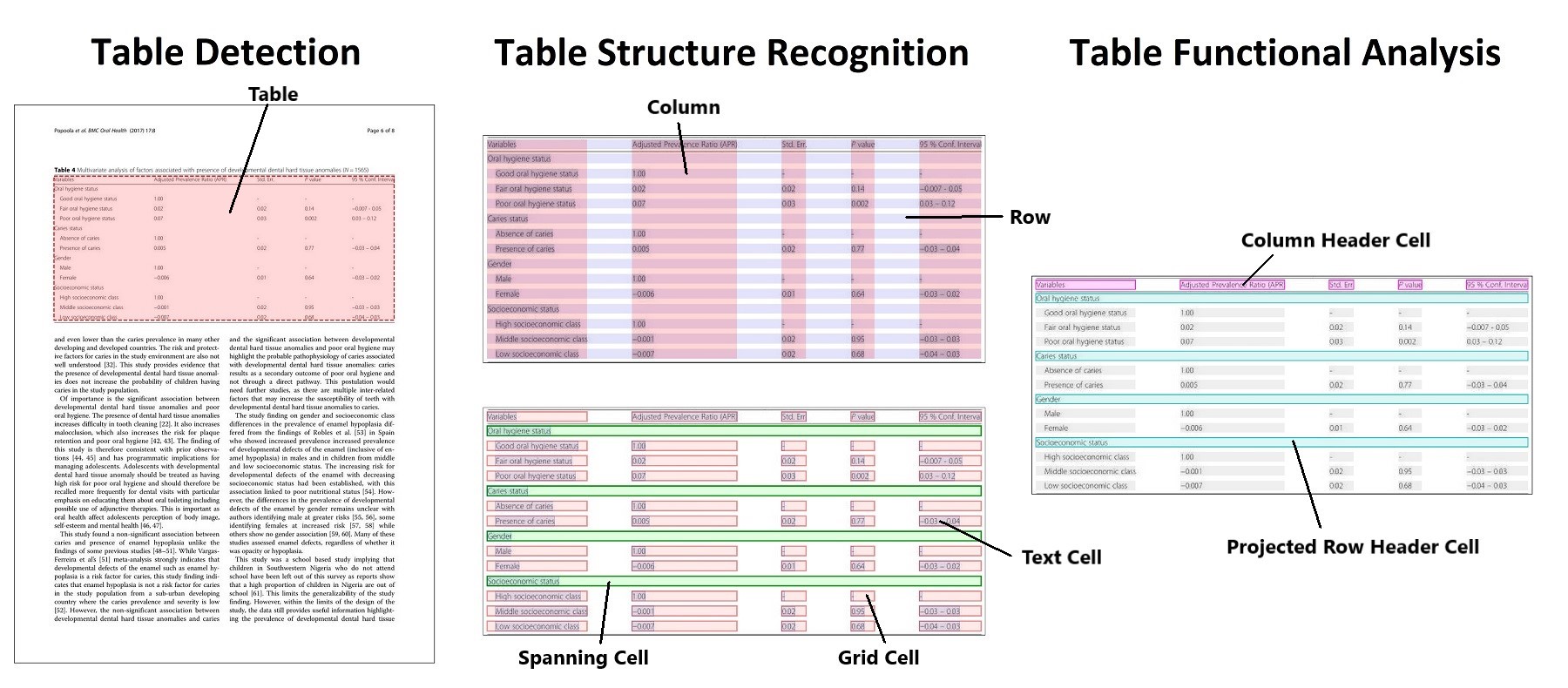
Microsoft Table Detection and Structure Recognition
While the Table Transformer Detection and Structure Recognition base models worked pretty well, I needed something that was more accurate and robust. There were limited resources available on how to fine tune the Table Transformer; the closest I could find was a notebook by Niels Rogge from the HuggingFace team who has a notebook on fine-tuning a DETR (DEtection TRansformer). He also has a couple of useful notebooks on inference using Table Transformer. Credits to these resources as they form a very big basis of what I did here.
There were a couple of asks on HuggingFace discussions on how to fine-tune the Table Transformer with own domain-specific data, such as this and this as well as on the official Table Transformer github issues, but there were no real guidance on how to go about doing it. I hope that this article and code repo will help to plug the gap in this space.
Pre-requisites and Data Formats 🔗
In the first part of this series, I wrote about how I set up a fully-local Label Studio for table annotation to get a clean domain-specific dataset ready for fine-tuning the table transformer.
There was a fair bit of confusion around correct bounding box format for DETR training as can be seen in this github issue. I will summarize the required format at various stages of the pipeline for a much clearer understanding.
To being with, here are a few common bounding boxes format:
- COCO format is xmin, ymin, width, height
- YOLO format is xcenter, ycenter, width, height
- Pascal VOC format is xmin, ymin, xmax, ymax
In some cases, the bounding boxes can also be further normalized to the range [0,1].
I defined a custom CocoDetection class in torchvision.datasets which makes it easy to load COCO-style datasets in PyTorch. The addition is the processor to resize and normalize the images and to turn the annotations (from COCO format) to the format that DETR expects (which is normalized YOLO format).
class CocoDetection(torchvision.datasets.CocoDetection):
    def __init__(self, img_folder, processor, train=True):
        ann_file = os.path.join(
            img_folder, "custom_train.json" if train else "custom_val.json"
        )
        super(CocoDetection, self).__init__(img_folder, ann_file)
        self.processor = processor

    def __getitem__(self, idx):
        # read in PIL image and target in COCO format
        img, target = super(CocoDetection, self).__getitem__(idx)

        # preprocess image and target (converting target to DETR format, resizing + normalization of both image and target)
        image_id = self.ids[idx]
        target = {"image_id": image_id, "annotations": target}
        encoding = self.processor(images=img, annotations=target, return_tensors="pt")
        pixel_values = encoding["pixel_values"].squeeze()  # remove batch dimension
        target = encoding["labels"][0]  # remove batch dimension

        return pixel_values, target
For evaluation that is defined under the compute_metrics function, you would see that the bboxes of the targets (which is from the val dataset) are first converted using the convert_bbox_yolo_to_pascal function as the val dataset was loaded using the CocoDetection class. This means that when the bboxes of the targets are passed to the compute_metrics function, they are already in normalized YOLO format and hence there is a need to convert it to Pascal VOC format (which is the format used for metric evaluation)
def convert_bbox_yolo_to_pascal(boxes, image_size):
        """
        Convert bounding boxes from YOLO format (x_center, y_center, width, height) in range [0, 1]
        to Pascal VOC format (x_min, y_min, x_max, y_max) in absolute coordinates.

        Args:
            boxes (torch.Tensor): Bounding boxes in YOLO format
            image_size (Tuple[int, int]): Image size in format (height, width)

        Returns:
            torch.Tensor: Bounding boxes in Pascal VOC format (x_min, y_min, x_max, y_max)
        """
        # convert center to corners format
        boxes = center_to_corners_format(boxes)

        # convert to absolute coordinates
        height, width = image_size
        boxes = boxes * torch.tensor([[width, height, width, height]])

        return boxes
@torch.no_grad()
    def compute_metrics(
        evaluation_results, image_processor, threshold=0.0, id2label=None
    ):
        """
        Compute mean average mAP, mAR and their variants for the object detection task.

        Args:
            evaluation_results (EvalPrediction): Predictions and targets from evaluation.
            threshold (float, optional): Threshold to filter predicted boxes by confidence. Defaults to 0.0.
            id2label (Optional[dict], optional): Mapping from class id to class name. Defaults to None.

        Returns:
            Mapping[str, float]: Metrics in a form of dictionary {<metric_name>: <metric_value>}
        """

        predictions, targets = (
            evaluation_results.predictions,
            evaluation_results.label_ids,
        )

        image_sizes = []
        post_processed_targets = []
        post_processed_predictions = []

        # Process targets
        for batch in targets:
            batch_image_sizes = torch.tensor(np.array([x["orig_size"] for x in batch]))
            image_sizes.append(batch_image_sizes)

            for image_target in batch:
                boxes = torch.tensor(image_target["boxes"])
                boxes = convert_bbox_yolo_to_pascal(boxes, image_target["orig_size"])
                labels = torch.tensor(image_target["class_labels"])
                post_processed_targets.append({"boxes": boxes, "labels": labels})

        # Process predictions
        for batch, target_sizes in zip(predictions, image_sizes):
            batch_logits, batch_boxes = batch[1], batch[2]
            output = ModelOutput(
                logits=torch.tensor(batch_logits), pred_boxes=torch.tensor(batch_boxes)
            )
            post_processed_output = image_processor.post_process_object_detection(
                output, threshold=threshold, target_sizes=target_sizes
            )
            post_processed_predictions.extend(post_processed_output)

        # Compute metrics
        metric = MeanAveragePrecision(box_format="xyxy", class_metrics=True)
For the bboxes of the predictions, the output from the Table Transformer model is in normalized YOLO format, and using the in-built processor method post_process_object_detection, it converts the normalized YOLO format to Pascal VOC format.
Hence when we perform the evaluation using MeanAveragePrecision from the torchmetrics.detection.mean_ap, we define the box_format = "xyxy" which is the Pascal VOC format.
General Notes for Fine-Tuning 🔗
The other steps should be relatively straightforward if you have some experience with using HuggingFace Trainer class for fine-tuning Transformer models.
Of note is a custom collate_fn to batch images together. As the image processor resizes images to have a min/max size of 800 for the table detection model, images can have different sizes. We pad images (pixel_values) to the largest image in a batch, and create a corresponding pixel_mask to indicate which pixels are real (1) and which are padding (0). It is important to note the resizing for different models as I noticed that for Table Transformer Detection, both min and max (in some cases, renamed as shorted and longest edge) are 800 and 800, while for Table Transformer Structure Recognition they are 800 and 1,000 (it is also different for the v1.1-all model). Check out the preprocessor_config.json to be clear of how input images should be preprocessed before being fed into the model.
def collate_fn(batch):
    processor = AutoImageProcessor.from_pretrained(
        "microsoft/table-transformer-detection"
    )
    pixel_values = [item[0] for item in batch]
    encoding = processor.pad(pixel_values, return_tensors="pt")
    labels = [item[1] for item in batch]
    batch = {}
    batch["pixel_values"] = encoding["pixel_values"]
    batch["pixel_mask"] = encoding["pixel_mask"]
    batch["labels"] = labels
    return batch
The provided code comes with a set of hyperparameters to help you get started quickly, but you are strongly encouraged to perform your own hyperparameter tuning. However, these defaults should give you noticeable improvements in performance to give you a sanity check that everything is working properly before you invest further time and effort in hyperparameter tuning. I personally tried a simple hyperparameter search using Optuna and logging via wandb for experiment result visualization.
Evaluation 🔗
In addition to training evaluation, you might also want to evaluate your fine-tuned models against other datasets. The pycocotools, as a fork of the original COCO API, provides a convenient way for evaluating and benchmarking object detection performance. I provided two codes for ease of evaluation. The model_inference.py loads your fine tuned model for inference and save the predictions in a json format. The metric_evaluation.py uses the prediction saved as finetune_pred.json to evaluate against the ground truth defined in custom.json. Below is an example of the metric evaluation results of my fine-tuned Table Transformer Detection model.
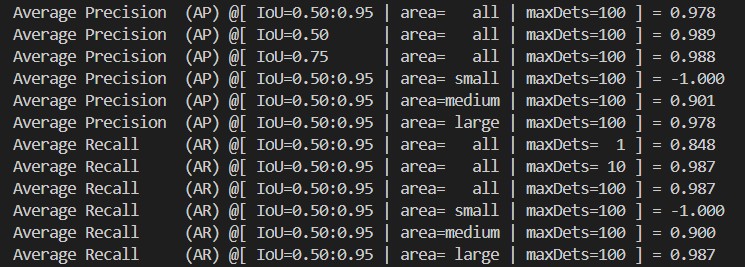
Example of mAP from pycocotools evaluation
Table Extraction 🔗
After fine-tuning the detection and structure recognition models, the last part of the pipeline is to place the tabular texts (using text extraction via OCR or directly from PDF) in the right cells.
I have found the use of gmft package to be particularly useful. It is lightweight, modular, and performant, and relies on Table Transformers as the base models. This allows you to easily drop-in and replace the base models with your fine-tuned models.
Note that gmft focuses on tables and aims to maximize performance on tables alone. It is limited to extracting tables from digitized PDF documents and does not have in-built OCR support, although I don’t think it is too difficult to add on an OCR engine into the pipeline.
Conclusion 🔗
When I first tried to fine-tune the Table Transformer, I couldn’t finda clear reference or working example. My hope is that this article helps in clarifying the main steps and gives you the confidence to adapt the code for your own use cases. Do feel free to let me know if you have any comments or questions.
References 🔗
- Hugging Face Docs — DETR: https://huggingface.co/docs/transformers/en/model_doc/detr
- Hugging Face Docs — Table Transformer: https://huggingface.co/docs/transformers/en/model_doc/table-transformer
- Table Transformer Paper (arXiv): https://arxiv.org/abs/2110.00061
- Table Transformer GitHub Repository: https://github.com/microsoft/table-transformer
- Tutorial — Fine-tuning DETR on Custom Dataset (Balloon): https://github.com/NielsRogge/Transformers-Tutorials/blob/master/DETR Fine_tuning_DetrForObjectDetection_on_custom_dataset_(balloon).ipynb